
The topic Google’s Gemma 4 shines on local systems – both big and small is currently the subject of lively discussion — readers and analysts are keeping a close eye on developments.
This is taking place in a dynamic environment: companies’ decisions and competitors’ reactions can quickly change the picture.
Google’s Gemma 4 comes touted as the latest evolution of Google’s multi-modal model offerings. Gemma 4 not only offers reasoning and tool use, but vision and audio functionality, and it’s available in a range of model sizes that target servers and local devices.
What’s striking about Gemma 4 is that even at the higher end of its size range, it’s still decently performant on personal hardware. Google claims this is due to innovations in the architecture of the model, but the proof is in the trying. Gemma 4 is quite responsive.
To that end, I took Gemma 4 for a spin on my own hardware to see how it fared for its advertised tasks.
Each of these model sizes is available in a slew of community-created editions, thanks to Gemma 4’s Apache 2 licensing. For instance, the 26B A4B model comes in a community edition with more compact quantizations (4-bit, 6-bit, etc.), which I used as one of the model mixes for this article.
I ran each model using my now-standard test bed: LM Studio 0.4.10 on an AMD Ryzen 5 3600 6-core CPU (32GB RAM) and an Nvidia GeForce RTX 5060 (8GB VRAM).
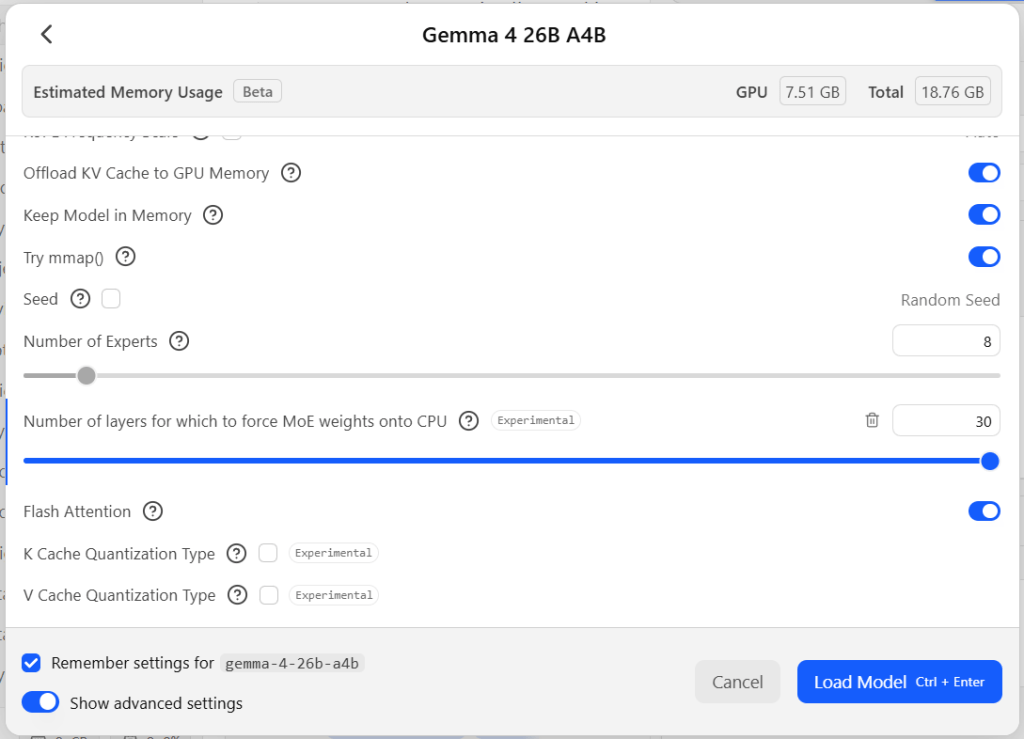
The 26B model was at the upper end of what I could run comfortably on my test hardware. I wasn’t able to fit the entire model into GPU memory, but I set the first 12 layers to run on the GPU (7.51GB VRAM), and I set the context length to 16384 tokens (total: 18.76GB RAM).
Getting good performance out of models that don’t fit in VRAM is always a challenge. However, Gemma 4 has, courtesy of its “mixture of experts” design, a feature to boost performance. LM Studio exposes this feature through a setting currently tagged as experimental. You can choose how many layers of the model to “force MoE [Mixture of Experts] weights onto the CPU,” which conserves VRAM and can speed up inference.
The MoE (mixture of experts) experimental setting in LM Studio. For models that use an MoE design, this setting forces the weights for that aspect of the model to be run on the CPU instead of the GPU. With Gemma 4, this resulted in a major speed boost for models too big to fit in memory.
Without the MoE forcing, the overall inference time and token generation speed cratered; the model could barely manage an average of 1.5 tokens per second even for simple queries. With MoE forcing turned on (with the maximum number of layers supported, 30), token generation speed jumped to anywhere from 5 to 13 tokens per second, depending on the rest of the system’s load. That’s still a far cry from the speed of the smaller models, but a lot more workable.
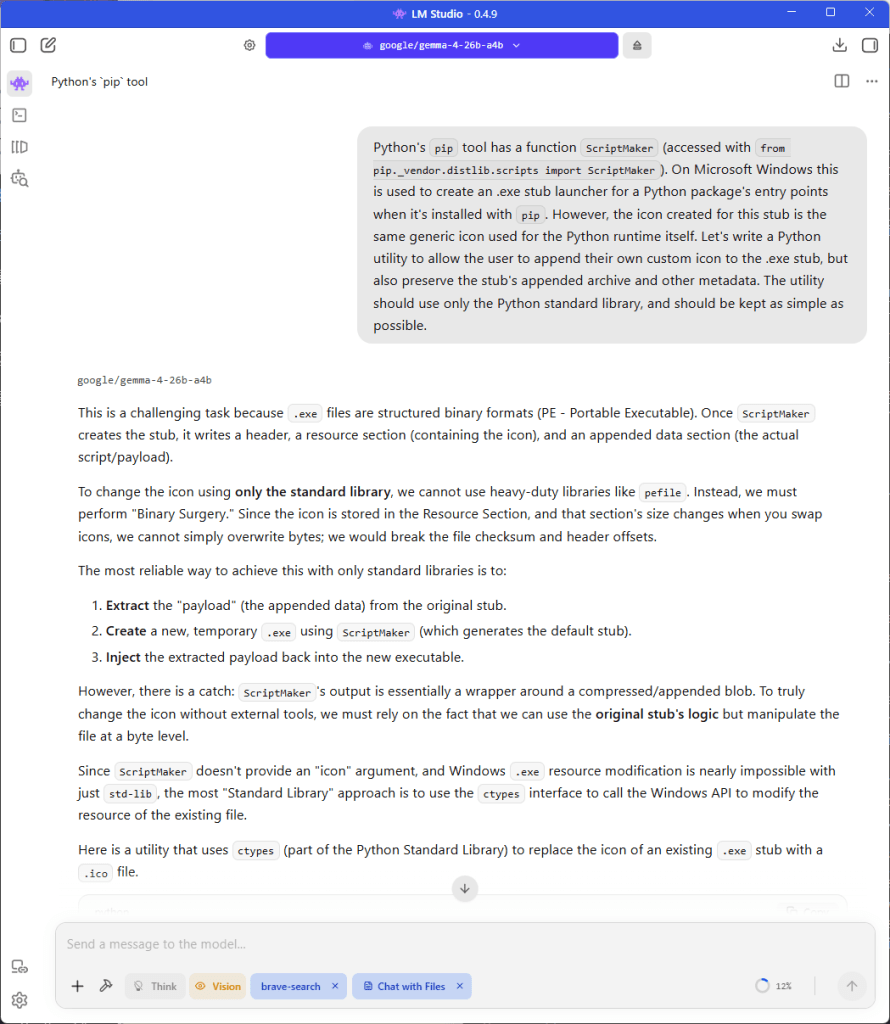
For faster time-to-first-token results, you can disable thinking, at the possible cost of less robust output. For the code-generation query, Gemma 4 spent 6 minutes 26 seconds thinking, and over 8 minutes generating the response (5,013 tokens, 9.55 tokens per second). The resulting code and explanation was not significantly more advanced or detailed than the non-thinking version.
Response from Gemma 4’s 26B parameter model to a query to generate code. This larger version of the model runs less quickly when it can’t fit entirely in memory, but its mixture-of-experts design helped offset that limitation.
When I switched to the LM Studio Community edition of the E4B model, I put all 42 layers on the GPU and kept the context at 16,384, all of which fit comfortably in VRAM with room to spare. The results were a major jump in speed: 72 tokens per second. The smaller model was less specific for certain queries — the code-generation query in particular didn’t generate a comprehensive code example, only a conceptual framework for one — but still did a decent job of analyzing the problem and suggesting constructive approaches. The “unsloth” edition of the E4B model, despite being slightly smaller, was about as performant and useful.
Examples of Gemma 4’s 26B parameter version generating image captions. The smaller versions of the model tended not to editorialize. The larger version sometimes needed specific guidance to be less verbose or florid.
For the “make this program more modular” prompt, I got roughly equivalent results across all incarnations of the model in terms of the advice given. The only major difference was that the smaller models ran far faster — 73.85 and 71.73 tokens per second vs. 9.3 for the big model.
The biggest takeaway from running Gemma 4 locally is how the mix-of-experts design in one of the larger incarnations of the model make it useful even on systems where the model doesn’t fit entirely into VRAM. The smaller incarnations of the model, even at lower quantizations, still work well, too. They also deliver results many times faster, and free up much more memory for larger context windows. Thus, the smaller models are well worth experimenting with as the first model of choice before moving up to their bigger brothers.