
The topic Building AI apps and agents with Microsoft Foundry is currently the subject of lively discussion — readers and analysts are keeping a close eye on developments.
This is taking place in a dynamic environment: companies’ decisions and competitors’ reactions can quickly change the picture.
At first glance, Microsoft Foundry looks like a big grab bag of every AI-adjacent service that Microsoft has offered in the last decade, plus some new ones. In Microsoft’s own words, “Foundry consolidates several previous Azure AI services and tools into a unified platform” and “unifies agents, models, and tools under a single management grouping.”
Microsoft Foundry helps application developers to build and deploy agents, which may use models and tools. It also helps machine learning (ML) engineers and data scientists to fine-tune models, run evaluations, and manage model deployments. Finally, it helps IT administrators and platform engineers to govern AI resources, enforce policies, and manage access across teams. It isn’t quite a floor wax and a dessert topping, but it does try to serve three distinct audiences.
Key capabilities of Microsoft Foundry for building agents include multi-agent orchestration, workflows, a tool catalog, memory, knowledge integration, and publishing. Key capabilities for operation and governance include real-time observability, centralized AI asset management, and enterprise controls.
Microsoft Foundry competes directly with the Google Cloud Agent development Kit (ADK), Amazon Bedrock AgentCore, and Databricks Agent Bricks. Additional competitors include the OpenAI Agents SDK, LangChain/LangGraph, CrewAI, and SmythOS.
The Microsoft Foundry Agent Service is a helpful platform that guides you through the development, deployment, and scaling of AI agents. These agents use large language models (LLMs) to handle tricky requests, connect with other tools, and do tasks on their own.
The service groups agents into three main types: prompt agents, which are easy to set up and great for quickly trying out ideas; workflow agents, which are visual or YAML-based tools that make automating several steps easier; and hosted agents, which are containers that let you manage your own code as well as frameworks like LangGraph.
Microsoft Foundry also has a model catalog with both new and well-known models, and a tool catalog that includes web search, memory management, and code execution.
The platform uses guardrails and controls to keep things secure, like stopping prompt injection. Plus, it supports private networks, versioning, managing the infrastructure, and full monitoring.
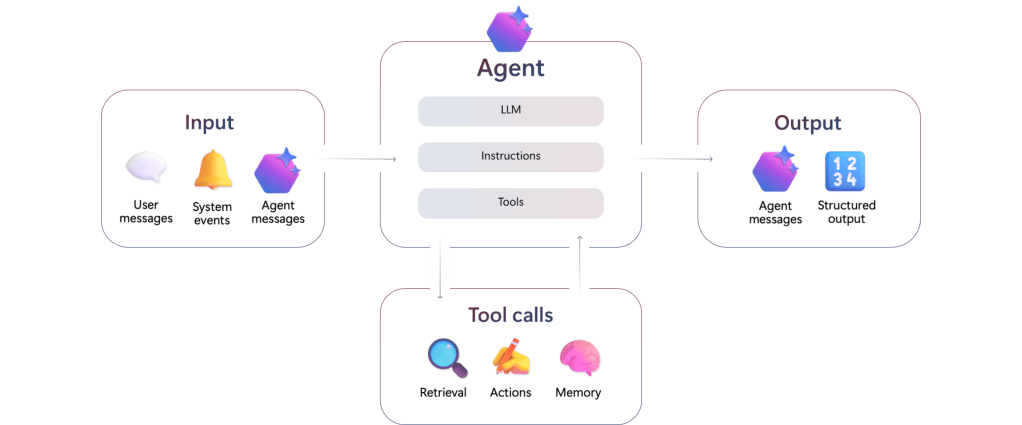
The Microsoft Foundry Agent Service accepts inputs from user messages, system events, and agent messages. The agent combines a large language model with instructions and tool calls. Tools can retrieve data, perform actions, and provide memory. Agents can send agent messages and emit structured output.
Microsoft Foundry Models is a collection of AI architectures, including foundational models, reasoning models, and models tailored for specific domains, brought to you by Microsoft and other companies. These models are grouped into those you can buy directly from Azure and those shared by the community. This grouping helps you figure out how much direct support Microsoft will give you and how well they’ll fit into your existing cloud setup.
Models from Microsoft come with official service level agreements and are well-integrated, while models from partners like Anthropic and Meta let you explore innovations under their own rules.
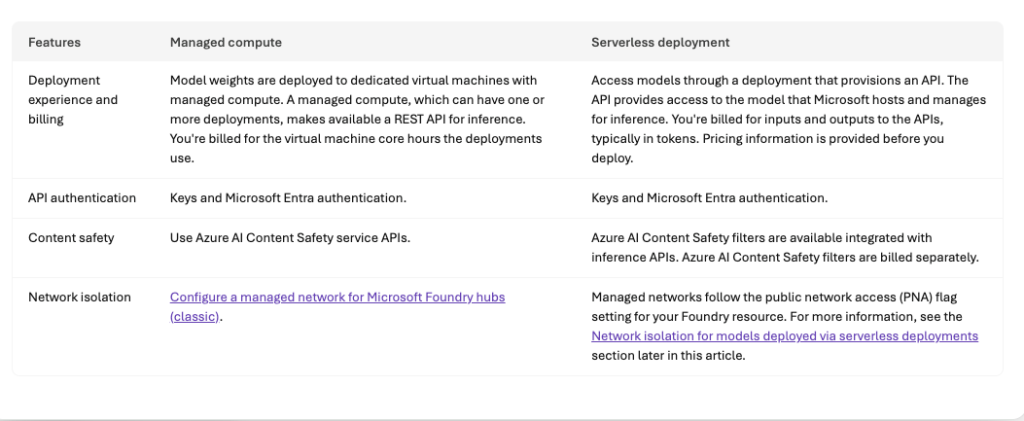
You can use the platform in two main ways: managed compute and serverless deployments. (You can check out Microsoft’s comparison table below.)
Managed compute means you get your own virtual machines where the model weights are stored, which is great for doing complex stuff like fine-tuning and keeping track of the model’s life cycle using Azure Machine Learning, but the VMs incur costs whenever they are active. Serverless deployments give you easy access to Microsoft’s models through APIs, and usually you pay based on how many tokens you use, not how much hardware you use.
To keep things safe, the platform has built-in content safety filters that watch out for anything bad, and you can (if necessary) lock down your data by turning off public network access and using private endpoints for all your hub-based project work.
When selecting models, you may want to consult the Foundry model leaderboard (screenshot below), which is found in the Discover/Models tab of “new” Foundry.
Comparison of managed compute and serverless deployment options for models on Microsoft Foundry. Managed compute deployments are billed by virtual machine core hours; serverless deployments are billed by usage measured in tokens.
Foundry model leaderboard. You’ll note that the highest-quality models are not necessarily the safest, fastest, or cheapest. You can sort this chart by any column.
The Microsoft Foundry Control Plane is essentially a dashboard that helps you keep an eye on all your AI agents, models, and tools in one place. It brings together all the admin stuff from different projects into a single view, so you can easily see how everything is doing. Plus, it lets you keep tabs on performance, costs, and compliance from just one spot.
The Control Plane breaks down the work of running things into different areas, like the Assets pane. The Assets pane keeps a list of all your AI resources, so you can find them easily and see how they’re doing. It also looks at what’s happening when they’re running and gives you a health score to spot any problems early. The Compliance pane sets up rules for the whole company using Microsoft Defender and Purview. It collects security alerts and policy violations and helps you fix them all at once to make sure everyone’s using the agents safely and following the rules.
The Admin and Quota panes keep an eye on who can do what and how much they’re using. This helps you manage costs and make sure no one’s hogging the resources. The Control Plane also keeps things running smoothly by using tools that automatically check for weaknesses, like prompt injection, and gives you tips on how to improve your prompts based on what’s happening.
Observability in Foundry Control Plane is a toolkit for keeping an eye on and fixing systems as they run, all while making sure the outputs are top-notch and safe. In the Microsoft Foundry world, this is divided into three main areas: checking things out, keeping tabs on them, and following their path.
First up, evaluation is like a detective’s work, where special tools look at things like how well the model fits together and if it’s safe, like checking for harmful materials or sneaky biases. You can even add your own evaluators to make sure it works for your specific needs. There are also built-in tools that give you an idea of how well it’s doing.
Then there’s production monitoring, which is like having a live camera on your apps. It connects with Azure Monitor to keep an eye on what’s happening, like how much it’s using and how slow it is, along with how good it’s doing. If something goes wrong, you get alerts so the tech team can fix it fast.
Finally, distributed tracing uses OpenTelemetry to show you exactly how your AI agents are working. This gives you a clear picture, so you can figure out tricky thinking or spot where the app is slowing down. You can use these tools from the start, checking your models, making sure everything is good before you launch, and even spotting any changes after deployment.
Microsoft Foundry allows you to develop agent applications in four programming languages, Python, C#, TypeScript/JavaScript, and Java. That said, the vast majority of samples and solution templates are in Python, typically with Microsoft Bison setup files for Azure. You can use Visual Studio Code or another IDE of your choice. You need project and AI permissions on Azure. You will also need the Azure CLI (az) and the Azure Developer CLI (azd) to use many of the solution templates. If you use Visual Studio Code, you’ll need the Foundry extension. In the unlikely event that you don’t already have Git installed in your environment, you should install it now, because you’ll want it to clone Foundry SDK sample repos.
If you wish, you can configure Claude Code for Microsoft Foundry. That lets you run the coding agent on Azure infrastructure while keeping your data inside your compliance boundary. In this configuration, unfortunately, you have to run Claude models through their Azure API and pay by the token, even if you have a flat-rate Claude subscription.
There are currently over a dozen AI templates (or 18, if you log into “new” Foundry and look at the Solution templates under Discover) available to help you get started with Microsoft Foundry. The Get Started with Chat template is a good first project. (See the architecture diagram below.)
You can use on-demand Foundry playgrounds for rapid prototyping, API exploration, and technical validation, to experiment with models, and to validate ideas. Experimenting with playgrounds is recommended prior to writing production code. There are four different playgrounds, one each for models, agents, video, and images.
LangChain is a framework for developing applications powered by language models. It enables language models to connect to sources of data, and also to interact with their environments. LangGraph extends LangChain’s capabilities for building multi-actor or agentic applications by orchestrating agents. You can combine LangChain and LangGraph with Microsoft Foundry models and other capabilities using the langchain-azure-ai Python package.
There are two kinds of Foundry agent workflows, declarative and hosted. Declarative agent workflows define predefined sequences of actions for your agents using YAML configurations rather than explicit programming logic; you can generate code from the YAML once you’ve tested it. Hosted workflows let multiple agents collaborate in sequence, each with its own model, tools, and instructions.
The Foundry MCP Server (preview) is a cloud-based version of the Model Context Protocol (MCP). It provides a collection of tools that allow your agents to interact with Foundry services by reading and writing data, all without needing to connect directly to the back-end APIs.
Fireworks AI is integrated with Microsoft Foundry on a preview basis. It allows you to use the latest open-source models and bring your own models onto Fireworks’ GPU-backed infrastructure.
This “Get started with AI chat” solution deploys a web-based chat application with AI capabilities running in Azure Container App. It uses Microsoft Foundry projects and Foundry Tools to provide intelligent chat functionality, and supports retrieval-augmented generation (RAG) using Azure AI Search. It lacks any significant security features.
Microsoft Foundry currently offers four SDKs, each implemented in four programming languages (Python, C#, TypeScript/JavaScript, and Java). When choosing the best development path for your project, select the Microsoft Foundry SDK if you are building applications that use agents, evaluations, or unique Foundry-specific features. If your priority is maintaining maximum compatibility with the OpenAI API or accessing Foundry direct models via Chat Completions, the OpenAI SDK is the better choice. For specialized tasks involving AI services such as Azure Vision, Azure Speech, or Azure Language, use the Foundry Tools SDKs. Implement the Agent Framework when your goal is to orchestrate multi-agent systems through local code.
Implementing guardrails improves model and agent safety by detecting harmful content, enhancing user interactions, and reducing AI output risks. Microsoft Foundry currently offers guardrails that can be applied to one or many models and one or many agents in a project. As has been the case for years, the risks that are handled are categorized as hate, sexual, violence, and so on, and the severity level threshold settings for content risks range from off to high. Guardrails can be applied at four intervention points: user input, tool call, tool response, and output.
To conform with Microsoft’s Responsible AI policy, Microsoft recommends that Foundry developers discover agent quality, safety, and security risks before and after deployment; protect, at both the model output and agent runtime levels, against security risks, undesirable outputs, and unsafe actions; and govern agents through tracing and monitoring tools and compliance integrations.
The 2024 predecessor to Microsoft Foundry was Azure AI Studio. One of the parts of AI Studio that I found most useful was the Playground, where you could find dozens of examples of effective instructions/prompt/model combinations in addition to the actual Playground for testing out your own. I wrote about this in my guide to generative AI development. The Playground has since evolved for agents, but the examples seem to have fallen by the wayside in the transition to Microsoft Foundry. The new playground is found under Build/Agents/Playground.
In the Foundry Agents Playground screenshot below, I provided the system instructions “You are a careful researcher who never makes up answers and always cites references,” and in my query asked it to summarize Kierkegaard’s massive “Concluding Unscientific Postscript,” a text I studied in college. Those system instructions tend to encourage models to stay on the straight and narrow, but don’t always prevent models from making up citations out of whole cloth. Hallucinated citations can seem legit even while being utter fabrications, as several lawyers have discovered to the detriment of their careers. If you use generative AI, you are still responsible for any answers you use, so you need to fact-check everything carefully, even if it sounds correct.
By the way, there’s a decent summary of prompt engineering techniques in the Microsoft Foundry documentation. It’s not as entertaining as the old examples, however.
The Microsoft Foundry Agents playground, found in the Build section, is a useful place to try out models, tools, guardrails, instructions, and prompts. Here I have asked the agent to summarize Kierkegaard’s “Concluding Unscientific Postscript,” with system instructions that say “You are a careful researcher who never makes up answers and always cites references,” using the open-weight mixture-of-experts (MoE) model gpt-oss-120b from OpenAI. The summary looks pretty good based on my memory of the text, although I have not checked the generated references for accuracy.
I tried one of the 18 Microsoft Foundry solution templates, “Get started with AI agents.” The entire process took me about an hour, ran almost entirely in the cloud, and cost me a whopping $0.02. That’s right, two cents. You can find the code on GitHub in the Azure-Samples repository.
The README doc for “Getting started with agents using Microsoft Foundry,” a basic sample solution for deploying AI agents and a web app with Azure AI Foundry and SDKs. Note the solution architecture diagram two-thirds of the way down.
Starting from the GitHub repo, you can click on the “Open in GitHub Codespaces” button or the “Dev Containers” button in the Getting Started section. I used the former, which essentially opens a VM-based Visual Studio Code environment in the Azure cloud. The latter opens the VS Code environment on your local machine and connects it to a development container in the Azure cloud.
The “Getting started with agents using Microsoft Foundry” solution opened and running in GitHub Codespaces. At this point the azd up command has completed, and has supplied an end point for the web interface.
In this solution, the agent uses Azure AI Search for knowledge retrieval against a vector database, and includes built-in monitoring for troubleshooting and performance optimization. It’s essentially retrieval-augmented generation (RAG) in web agent form.
The running agent answering questions about the uploaded product catalog. This AI assistant can perform some of the tasks that would otherwise fall to a human customer service agent either talking on the phone or texting with a potential customer.
Overall, Microsoft Foundry acquitted itself well in my test of one of its major use cases, helping application developers to build and deploy agents that use models and tools. I found the ease of use good, the selection of models solid, the Agents Playground excellent, and the agent types and framework support very good.
I liked Microsoft Foundry about as well as I liked the Google ADK (reviewed here), and better than I liked Amazon Bedrock AgentCore (reviewed here). I didn’t test Microsoft Foundry’s model fine-tuning or IT administration capabilities.