The topic 5 misconceptions about home networking you still believe is currently the subject of lively discussion — readers and analysts are keeping a close eye on developments.
This is taking place in a dynamic environment: companies’ decisions and competitors’ reactions can quickly change the picture.
As bandwidth climbs and the number of devices in a home balloons further, it has never been more obvious that getting your home network right is important. And yet, some surprisingly stubborn myths continue to shape the way people set up and troubleshoot their networks. While some of these misconceptions are harmless, there are many that actively harm the performance and security of your home network, and it’s time we leave them behind for good.
It’s one of the most intuitive assumptions in networking: more bars means a better connection. Unfortunately, the relationship between signal strength and actual performance is more complicated than that.
Wi-Fi signal strength, often measured as RSSI, or Received Signal Strength Indicator, and it tells you how well your device is hearing the router. What it doesn’t tell you is anything about the quality of that connection or how much usable bandwidth is actually getting through. A device sitting near a router on a heavily congested channel can show full bars while delivering painfully slow speeds. Meanwhile, a device with fewer bars can perform significantly better if the other variables are in good shape.
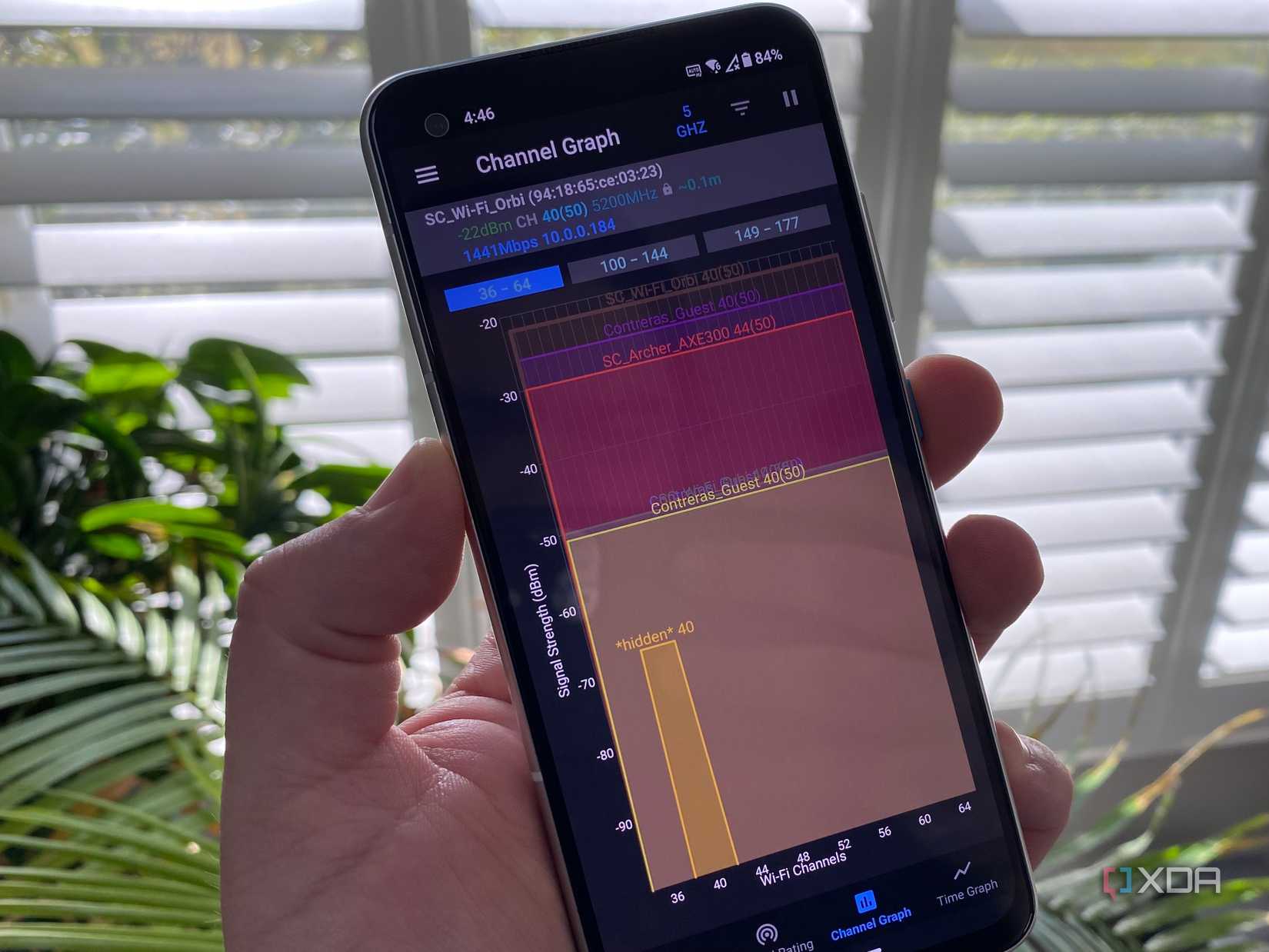
If your connection feels sluggish despite strong signal, the problem might not be signal strength at all. Tools like Wi-Fi Analyzer on Android or similar apps can help you identify channel congestion and find a cleaner frequency to operate on.
Opting for a more central placement is the most common piece of router advice on the internet, and it’s not wrong, it’s just a bit incomplete. Where your router sits geographically is one variable among many, and in some homes, it’s not even the most important one.
The materials between your router and your devices matter enormously. Concrete and brick walls are notorious for absorbing and deflecting Wi-Fi signals. Metal objects like filing cabinets, appliances, and wire shelving can reflect and scatter wireless signals unpredictably. Even something as simple as placing your router inside a wooden cabinet can noticeably reduce performance. Height also plays a role, because Wi-Fi signals propagate outward and slightly downward, so a router elevated on a shelf will generally cover more of a room than one sitting on the floor behind a couch.
There is a meaningful difference between a power cycle and a factory reset, and conflating the two can cause real headaches.
A power cycle, which involves unplugging the router, waiting a few seconds, and plugging it back in, is generally safe and occasionally useful. It clears the router’s temporary memory, re-establishes your connection to the ISP, and can resolve minor software hiccups. A factory reset is something else entirely: it wipes the router back to its default out-of-box state, which means any custom configuration you’ve set up goes with it. That includes your network name and password, any port forwarding rules you’ve configured for games or home servers, custom DNS settings, parental controls, and any static IP assignments. We treat router resets a lot like power cycles, but in reality, the latter is much closer to a last resort than an initial step. A full router reset can actually complicate the rest of the troubleshooting process, so it’s best to leave it till the end.
With the rise of Wi-Fi 6 and the introduction of the 6 GHz band, it’s tempting to think of 2.4 GHz as a relic that should be avoided. The reality is that each band has a distinct set of trade-offs, and dismissing 2.4 GHz outright leaves performance on the table in certain situations.
5GHz delivers faster speeds at close range, which makes it the better choice for devices sitting in the same room as the router. However, higher frequency signals lose strength more quickly and have more difficulty passing through walls and floors. 2.4GHz, by contrast, travels farther and penetrates obstacles more effectively, making it the better choice for devices at a distance or separated from the router by building materials. Smart home devices, which are often low-bandwidth and spread throughout the home, frequently perform more reliably on 2.4GHz for exactly this reason. The newest Wi-Fi 6E routers add a 6GHz band that offers impressive speeds in close proximity with minimal congestion, but its range limitations make it the most situational of the three. Understanding which band suits which device and which location is more useful than defaulting to the newest or fastest option available.
Make your Wi-Fi great again by removing your smart TV from it
This is one of those features that is almost a misnomer by the way it’s used today. Guest networks exist on most modern routers because they were once used to give visitors internet access without handing over the main network password, and it’s still used for that sometimes, but it really barely scratches the surface of what they can actually be used for.
The more compelling use case is device isolation for your smart home hardware. IoT devices like smart thermostats, security cameras, connected light bulbs, and robot vacuums have a well-documented history of featuring security vulnerabilities. Manufacturers of these products have a very mixed record when it comes to timely firmware updates, and many of these devices are running software that never gets patched. By placing IoT devices on your guest network, you isolate them from the computers, phones, and tablets on your main network. If a smart device is ever compromised, an attacker’s access is contained to that isolated network rather than your primary one where more sensitive devices live.
Home networking is one of those areas in tech where the conventional wisdom lags well behind the technologies itself. Advice that was reasonable five or ten years ago gets passed around today like nothing has changed. A little bit of extra attention to detail in a few areas can help with network performance and security immensely, and none of it requires a networking background or an overhaul with expensive equipment.