The topic I quit using Adobe Firefly for a free open-source alternative is currently the subject of lively discussion — readers and analysts are keeping a close eye on developments.
This is taking place in a dynamic environment: companies’ decisions and competitors’ reactions can quickly change the picture.
The controversies around image and video generation are hard to ignore; whether training data was scraped without consent, or artists are getting compensated, or whether the outputs are doing something genuinely new or just laundering someone else’s style. Adobe Firefly was the one that felt the least icky since it’s trained on licensed Adobe Stock content and public domain stuff, but it’s still paywalled past the free tier credits. On the other end of it, there’s ChatGPT, which had its whole Studio Ghibli moment last year that I’d rather not get into here.
I’m not arguing anyone needs genAI – most of the time I genuinely don’t think we do. But there are odd little cases where it’s actually useful, like roughing in a placeholder visual for a design mockup before the real asset exists, or sketching out a tattoo concept before committing if you have no idea how to draw. So I haven’t written the whole space off, I just hadn’t found a tool I felt okay using. Then I came across ComfyUI, and it’s been a different kind of experience entirely.
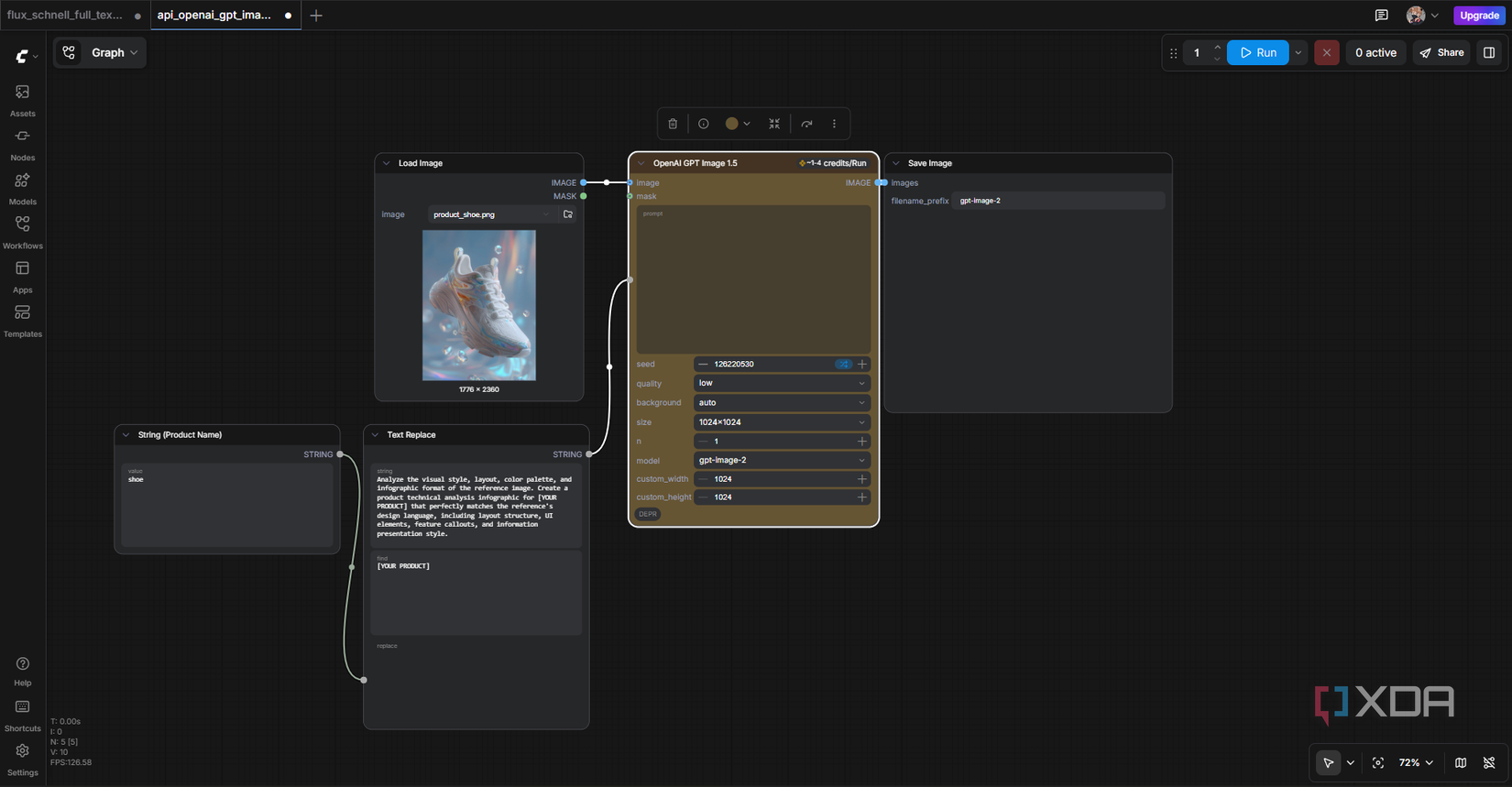
ComfyUI is so expansive that it’s easy to miss something simple
ComfyUI isn’t a “type a prompt then get an image” type of tool. It’s a node-based GUI for running open-weight image models like Stable Diffusion and Flux, and the whole point is that you build the image generation pipeline yourself by connecting blocks on a canvas. Each block does one specific job, like loading the model, encoding your prompt, sampling, decoding, saving… and you wire them together with lines. If you’ve used Figma’s prototype mode or Blender’s shader editor, the vibe is similar.
It’s open source, built on Python and PyTorch, and was originally created in January 2023 by a developer called Comfyanonymous. There’s a whole backstory around Stability AI being briefly involved and then comfyanonymous leaving in mid-2024 to start an independent group called Comfy Org with other core contributors – the project’s been community-driven since, and it’s now the launch platform for new open-source models from Black Forest Labs (Flux) and even Stability AI’s own releases. Beyond just generating visuals, the node setup means you can build workflows for things like inpainting, upscaling, animation passes, and chaining multiple models together in ways prompt-only tools don’t really let you touch.
For the setup, you’ve got options. The easiest is the official desktop installer from comfy.org/download, which works on Windows and Mac (Apple Silicon). For Linux or if you just want more control, you clone the repo and run it manually. You’ll want to install PyTorch first with the right CUDA, ROCm, or Metal version for your hardware before running the requirements file or it probably won’t work:
You’ll also want to grab a model checkpoint – Flux Schnell or SDXL are good starting points – from Hugging Face or CivitAI, and drop it into ComfyUI/models/checkpoints/. The catch is that it’s GPU-hungry. 4GB VRAM is the bare minimum for modern models, but 8-12GB is the realistic floor for a smooth experience.
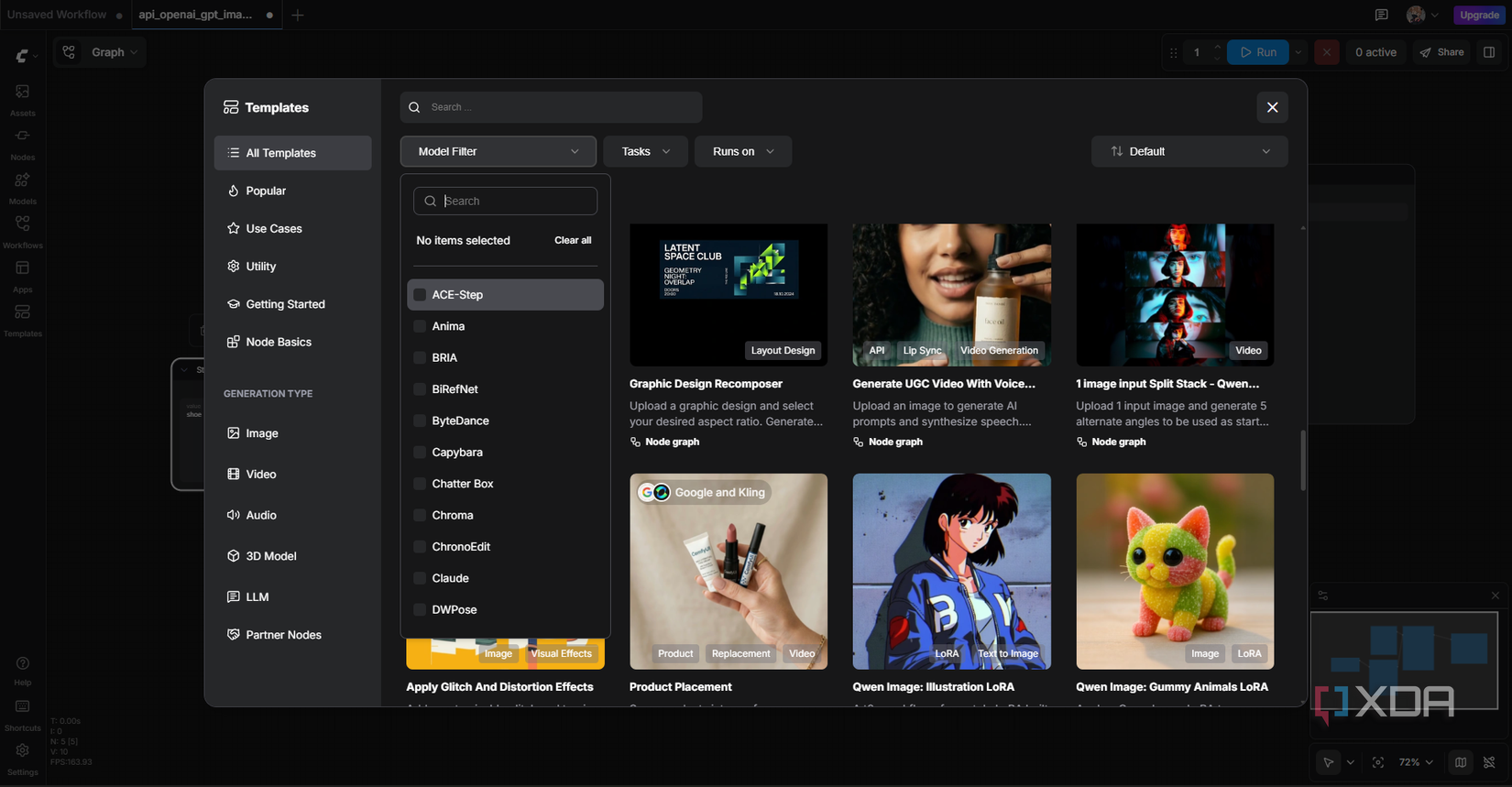
The canvas starts empty and it’s pretty intimidating at first, but the Templates sidebar saves you. There are over 350 pre-built workflows ready to go, and this is where I recommend beginners start poking around. The left sidebar also has Assets, Nodes, Models, and your saved Workflows. Each node has parameters you can tweak inline, dropdowns for samplers, and text fields for prompts. It’s the closest thing in AI image gen to opening up a design editor like Figma.
The nodes are where ComfyUI earns its reputation. A basic text-to-image flow has maybe seven of them: Load Checkpoint (the model), two CLIP Text Encodes (one positive prompt, one negative), Empty Latent Image (sets dimensions), KSampler (the actual generation), VAE Decode (turns it into a viewable image), and Save Image (outputs the file). Every box has inputs on the left and outputs on the right, and you drag lines between them to wire up the flow.
I ended up spending so much time dragging these little things around that I almost forgot to actually run the workflow with every setup! There’s something weirdly satisfying about lining the boxes up properly and watching the wires connect cleanly between them. The KSampler is where most of the magic happens. Seed controls randomness – same seed plus same prompt equals same image, which is huge for reproducibility. Steps determines how many denoising passes happen. CFG controls how strictly the model follows your prompt. Sampler and scheduler are the actual algorithms doing the denoising. This is what Firefly and ChatGPT Image just don’t give you, you’re stuck with their defaults.
Picking the model also matters. Flux Schnell is fast and license-friendly, Flux Dev gives more quality at slower speeds, and SDXL still holds up for general use. The templates already have the right model wired in for whatever you’re trying to do, so you don’t need to think about it for your first few runs. The output I got was honestly not even what I cared about by the end, and building the flow turned out to be the better part of it.
Not going to lie, I’m still not fully sold on AI image generation as a category – the ethics around it are messy and probably will be for a while. But ComfyUI with an open-weight model feels different from the closed, paywalled, training-data-questionable options out there. It runs on my own hardware and it puts the actual mechanics of image generation in front of me rather than hiding them in a prompt box. If you’ve been on the fence about this like me, this is probably the one I’d actually recommend trying.